
Proxy-O-Matic – NGINX Proxy Generator for Automic REST API
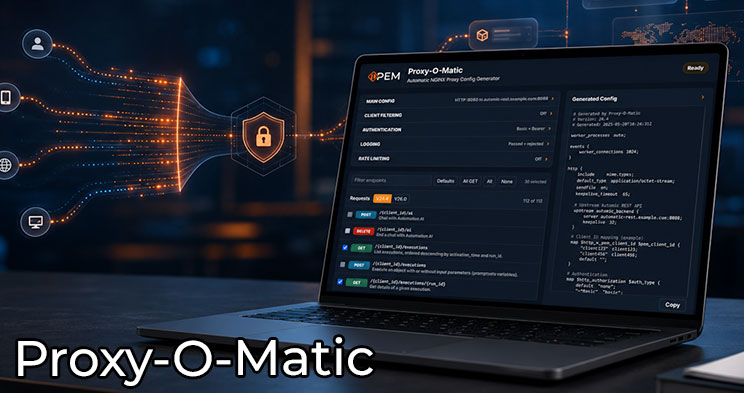
With Proxy-O-Matic, PEM offers a handy tool that significantly simplifies the creation of NGINX proxy configurations for the Automic REST API. Instead of manually putting together proxy rules, admins can select directly in the browser which REST endpoints should be available and which additional settings are required for security, authentication, logging, or rate limiting.
The tool is primarily aimed at Automic admins and technical teams who want to control REST API access more precisely, secure it, or prepare it for specific use cases. Based on the selected options, Proxy-O-Matic generates a sample configuration that can then be reviewed, customized, and tested in your own environment.
Precise control over REST API endpoints
The Automic REST API offers many possibilities for automation, integration, and querying system information. In practice, however, not all endpoints should always be equally accessible. This is exactly where Proxy-O-Matic comes in: via a clear interface, individual requests can be selected, filtered, and prepared for later NGINX configuration.
This allows you, for example, to define which GET, POST, or DELETE requests should be permitted via the proxy. This helps to better structure REST API access and reduce unnecessary or unwanted access options.
Support for various Automic versions
Proxy-O-Matic takes into account REST API definitions for different Automic versions, including Automic V24.4 and V26. This allows administrators to select the appropriate foundation for their specific environment and better tailor the generated proxy configuration to the Automic version in use.
This can be particularly helpful during upgrades or in parallel test environments, as REST API endpoints and available features may differ between versions. The tool thus provides practical guidance when setting up or reviewing existing proxy configurations.
Focus on Security, Authentication, and Logging
In addition to selecting REST API endpoints, Proxy-O-Matic also supports typical requirements related to the secure operation of a proxy. These include settings for authentication, client filtering, logging, and rate limiting. This allows the generated configuration to not only map access to specific endpoints but also incorporate additional security measures.
The generated NGINX configuration is intended as a technical foundation and not as a ready-to-deploy production release. Every configuration should be carefully reviewed, tested, and adapted to your own security requirements before being deployed in a production environment.
A handy tool for Automic admins
Proxy-O-Matic complements the technical content on PEM with a ready-to-use tool for everyday Automic tasks. It combines REST API knowledge, proxy basics, and hands-on configuration work in an interactive interface. This makes the tool suitable both for learning and as a starting point for real-world technical implementations.
For admins working with the Automic REST API, NGINX reverse proxy setups, or secure integration scenarios, Proxy-O-Matic offers a quick and intuitive introduction. The generated configuration can serve as a template to plan, document, and further develop your own setups more efficiently.
Learn Automic with PEM!
Would you like to learn more about Automic without having to travel across the country for workshops? At PEM, you decide when and how you want to continue your education! In interactive courses, tutorials and videos, you will learn everything you need to know about Automic – and more! And we are always there for you via comment function or email.
Does that sound interesting? Then get started today with PEM, Automic Training 2.0 and year-round Automic support!
FAQ about Automic Training on PEM
PEM is the most innovative and fastest growing Automic learning platform. It offers PEM members a comprehensive range of online training courses that can be accessed 24/7 and from anywhere. The platform includes dozens of videos and interactive courses and is aimed at beginners and professionals alike.
To meet different needs, PEM offers different types of content: courses, tutorials, learning paths, labs and tools.
- In the courses and tutorials you will learn everything about Automic in entertaining and interactive videos.
- The learning paths offer comprehensive training on a specific Automic topic. For example, the 11-part operator learning path is suitable for beginners. Are you already an Automic expert? Then you will definitely learn something with the database SQL learning path.
- Labs are automated environments that are available at the touch of a button and where what has been learned can be put into practice.
- Tools with appropriate instructions are regularly provided on PEM . This allows Automic processes to be automated and simplified even further.
In our library, you’ll find all content items currently available on PEM. And every week, we add more items to learn Automic.
PEM Labs are comprehensive, pre-configured Automic environments designed to provide users with a hands-on and immersive experience. These labs offer instant access to multiple Automic versions, allowing users to experiment with functionality and explore new features effortlessly. Available on demand and at no additional cost for members, PEM Labs eliminate the need for complex setups or extra expenses. Whether you’re a beginner or an experienced professional, they serve as realistic sandbox environments ideal for learning and experimenting with Automic.
Labs are provisioned on demand with a single click and are automatically deleted after 24 hours.
There are two different deployment-variants for the Labs:
- Labs for Operator and Designer
These provide access to a dedicated Automic Client via the Automic Web Interface (AWI). - Labs for Admins
These labs include OS-level access through a browser, enabling members to perform all administrative tasks, including those at the operating system level.
PEM Labs are available in three formats:
- Test Labs
These labs are empty Automic clients or systems that members can use for their experiments. - Course Labs
These labs include one or more scenarios where users are tasked with solving practical exercises, similar to classroom training sessions. - Story Labs
Story Labs are like Course Labs but incorporate a storyline to make the experience more engaging and entertaining. Think of them as small adventure games where you solve puzzles using Automic.
The Operator, Designer, and Admin roles in PEM align closely with the roles available within Automic itself. Each role is tailored to specific responsibilities, ensuring users focus on the skills and knowledge most relevant to their work:
- Operator:
Operators are responsible for monitoring, executing, and managing workflows in Automic. In PEM, the Operator role covers topics like workflow execution, troubleshooting, and day-to-day operations to ensure smooth automation processes. - Designer:
Designers are the architects of workflows and automation solutions in Automic. The Designer role in PEM includes content on creating, optimizing, and maintaining workflows and objects, with a focus on best practices for efficiency and scalability. - Admin:
Admins handle system-level configurations, user management, security settings, and advanced maintenance tasks in Automic. PEM’s Admin role offers in-depth training on system setup, troubleshooting, and managing complex environments, including OS-level access through PEM Labs.
By mirroring Automic’s role structure, PEM ensures that members can seamlessly apply what they learn to their actual responsibilities within the software, making the training practical and highly relevant.
We host live sessions called Solution Corners 12 times a year, offering direct interaction with our experts. These sessions are open for questions on any Automic topic, and members can submit questions in advance for a more in-depth discussion.
Additionally, we provide online consulting—exclusive video conference sessions with our Automic specialists. Members with a consulting quota can book appointments directly via the experts’ calendars, ensuring flexible and personalized support.
In normal Automic training courses, the trainer is available to you for a few days. If you’re lucky, you might be able to provide input before the training, and if you’re particularly lucky, you might be able to ask 1-2 questions in the weeks following the training.
Our members can send us an email at any time. We answer questions immediately by email. If our members have questions about specific topics, they can also use the comment function. We call this “year-round Automic support”.
You always sign up for a membership for one year. After that, it is usually renewed automatically.
You can cancel at any time up to one month before the end of the contract with a simple email. Of course, you can limit the membership to one year at the beginning of the contract.